



A Personal Cloud That’s Easy to Recommend
The UGREEN NASync DH2300 succeeds by focusing on what matters most to home users: simplicity, reliability, and ease of use. The setup process is quick, the software is polished, and the mobile app offers far more functionality than many competing NAS platforms.
PROS
- Extremely easy setup that makes NAS ownership approachable for first-time users.
- Polished UGOS Pro interface with an excellent mobile app that provides nearly full system management.
- Reliable performance for backups, file sharing, and personal cloud storage over a Gigabit network.
- Simple and secure remote access through UGREENlink, making files accessible from virtually anywhere.
CONS
- Limited to a single 1GbE Ethernet port, which caps maximum network performance.
- No M.2 NVMe slots for SSD caching or high-speed storage.
- RAID options are limited compared to more advanced NAS platforms.
- Hard drives are not included, increasing the total cost of ownership.
- DESIGN
- EASE OF USE
- PRICE
UGREEN NASync DH2300 2-Bay NAS
Discover how the UGREEN NASync DH2300 performed in real-world testing, including setup, RAID configuration, Wi-Fi performance, remote access, and everyday use as a personal cloud storage solution.
Cloud storage has become part of my everyday life. Whether I’m backing up photos from my phone, storing important documents, or sharing files between multiple devices, services like Dropbox, iCloud, and pCloud make it easy to keep my data accessible. The downside is that convenience usually comes with recurring subscription fees and requires trusting someone else to store your data.
A personal cloud offers a different approach. Instead of uploading your files to a third-party provider, a network attached storage (NAS) device lets you create your own private cloud that lives in your home. You keep ownership of your data while still being able to access it from your computer, smartphone, or tablet, whether you’re at home or away.
The UGREEN NASync DH2300 is designed for people who want that experience without the complexity traditionally associated with NAS devices. After spending some time using the DH2300 as my primary personal cloud, I wanted to see whether it could replace subscription-based cloud storage for everyday file management. In this review, I’ll walk through the setup process, performance testing, software experience, and what it’s actually like to live with the system on a daily basis.

About the UGREEN NASync DH2300
The UGREEN NASync DH2300 is a two-bay network attached storage (NAS) device designed for users who want the convenience of cloud storage without paying recurring subscription fees. UGREEN positions the NASync DH2300 as an entry-level personal cloud designed for home users and families who want centralized storage without the complexity often associated with traditional NAS devices.
Powered by an eight-core Rockchip processor paired with 4 GB of LPDDR4X memory, the DH2300 runs UGREEN’s UGOS Pro operating system and supports up to 64 TB of total storage using two SATA hard drives. It offers Basic, JBOD, RAID 0, and RAID 1 storage configurations, allowing users to choose between maximum capacity, improved performance, or data redundancy depending on their needs.
Setup is performed through the UGREEN NAS mobile app or a web browser, with a guided installation process that walks users through drive installation, storage pool creation, and account setup. Once configured, files can be accessed from Windows, macOS, Linux, iPhone, iPad, Android devices, web browsers, and compatible smart TVs, making it easy to keep files synchronized across multiple devices.
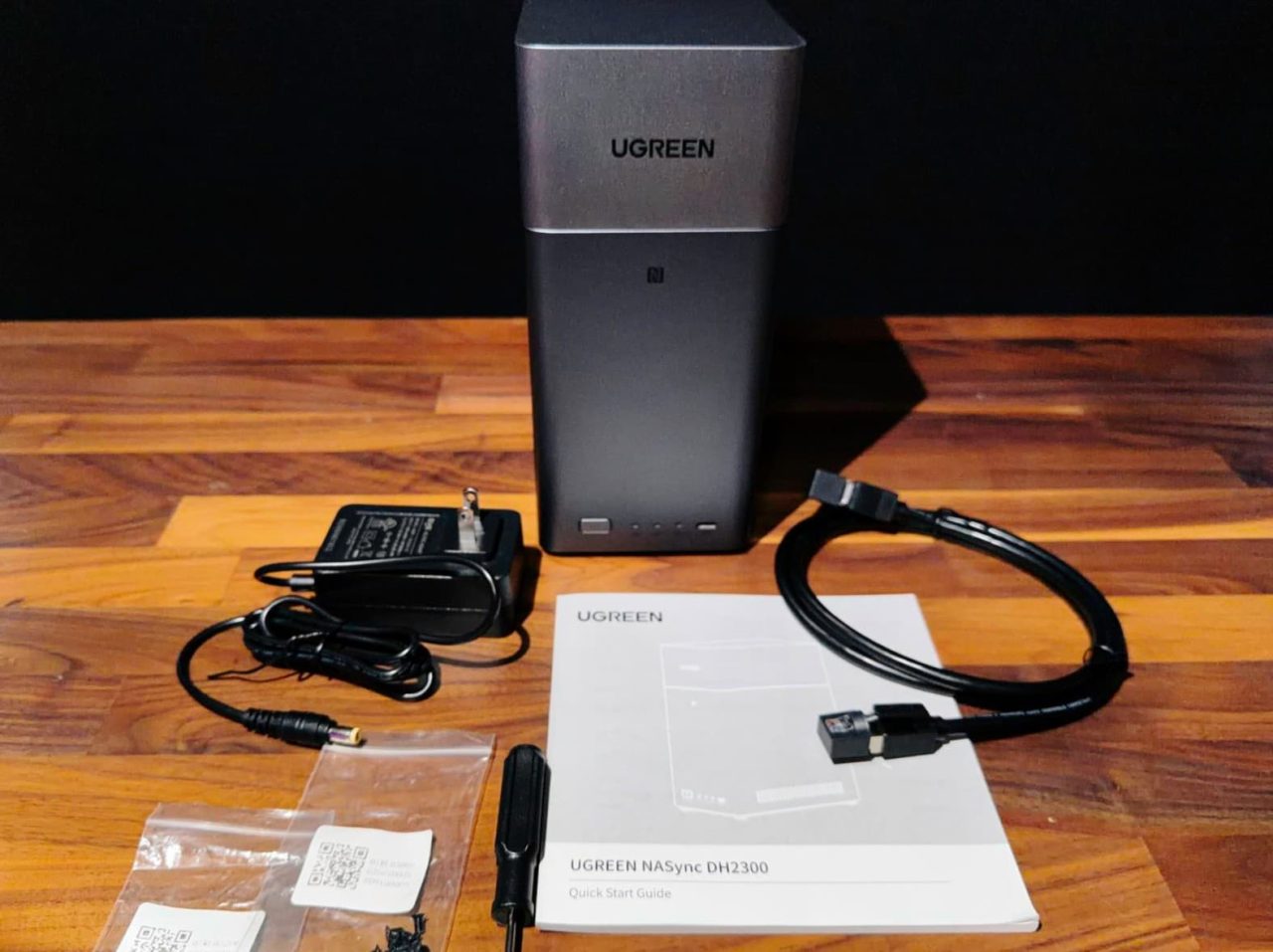
Features & Specs
- Processor: Rockchip A72+A53, 8 cores, 2.2 GHz
- RAM: 4GB LPDDR4X
- Maximum Storage: 64TB (32TB x 2)
- SATA Drive Bays: 2
- System Drive Capacity: 32GB eMMC
- M.2 SSD Drive Slots: n/a
- Operating System: UGOS Pro
- RAID: JBOD, Basic, RAID 0, RAID 1
- LAN Ports: 1GbE x 1
- USB-A: 5Gbps x 2
- USB-C: 5Gbps x 1
- HDMI: 4K 60Hz
- SD Card Slot: n/a
Pricing & Availability
The list price for the DH2300 is $219.99 from ugreen.com. It’s currently being offered for $199.99 on Amazon (at the time of publishing). This is sold without hard drives. For testing purposes, I used 2 x WD Red Plus (WD20EFPX) 2TB HDD. At the time of publishing, they are being offered for $154.99 for one hard drive. So depending on the amount of storage or the speed of the HDD you select, the total cost of ownership depends heavily on the drives you choose. Budget-conscious users can start with smaller-capacity drives, while those looking to maximize the DH2300’s 64 TB capacity should expect the storage to cost considerably more than the NAS itself.
Setup
Setting up the UGREEN NASync DH2300 was a very straightforward process. From the time I powered on the NAS until I was looking at the UGOS Pro desktop, the initial setup took only a couple of minutes. Excluding the time required to synchronize the RAID array, I spent less than five minutes getting the system up and running.
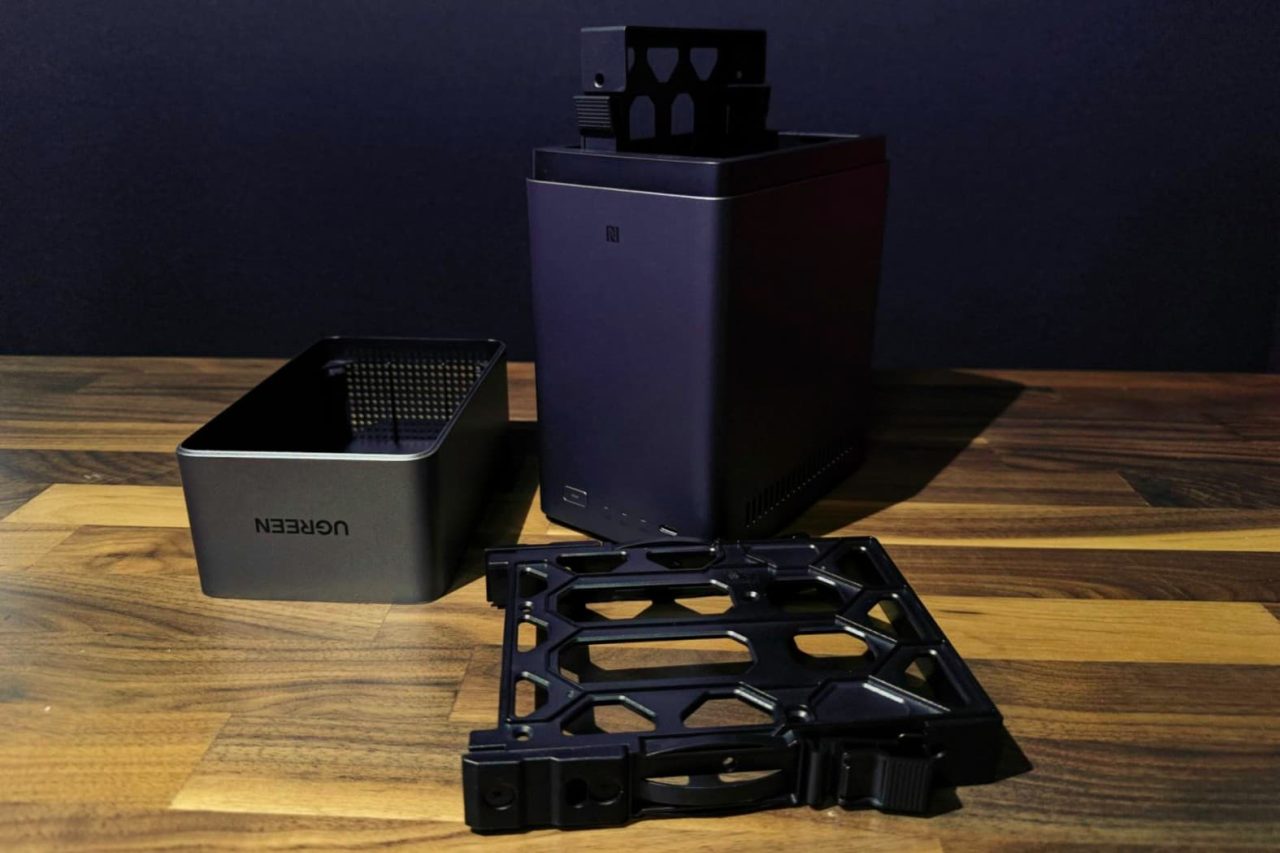
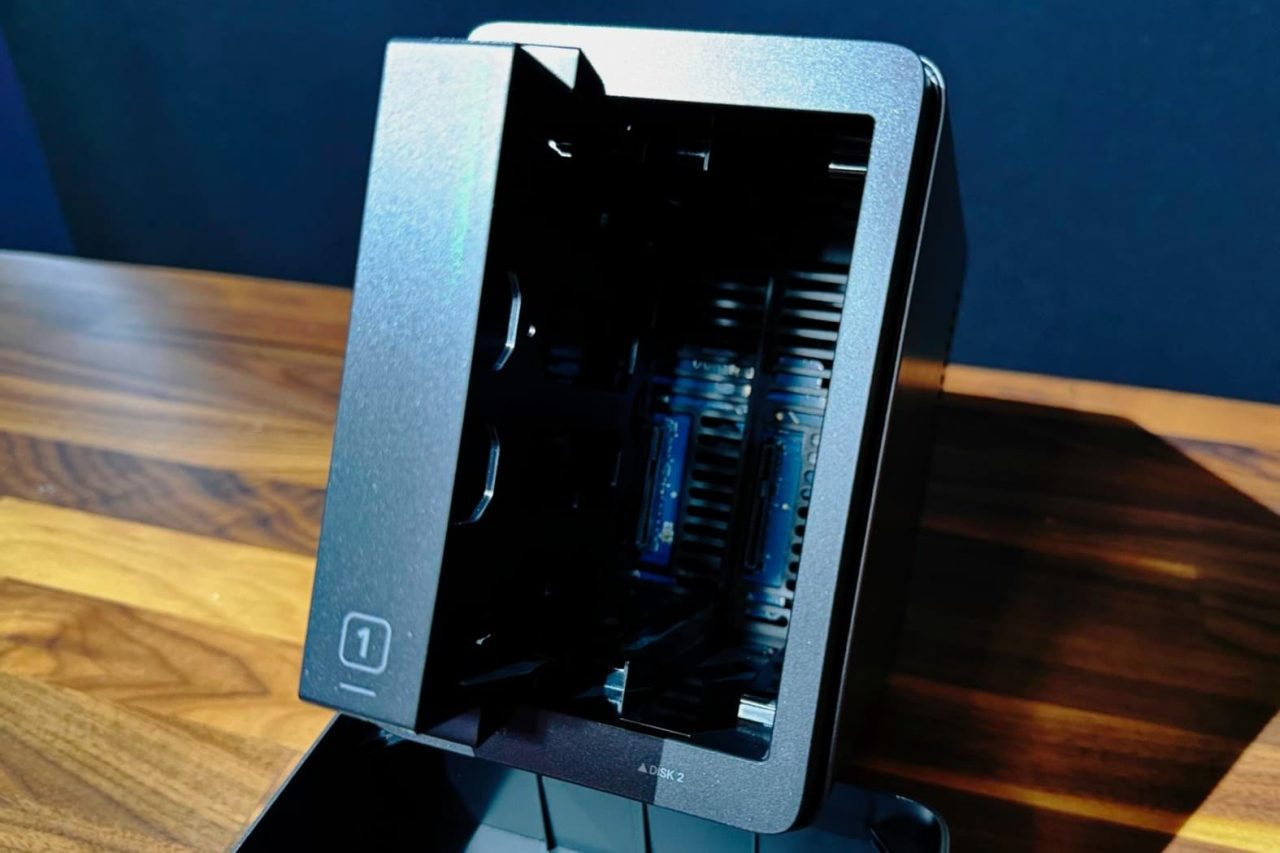
After unboxing the DH2300, I installed two 2 TB WD Red Plus (WD20EFPX) hard drives into the included drive trays. UGREEN includes both a screwdriver and the mounting screws in the box, so there was no need to hunt down any tools before getting started. Once the drives were secured, I slid the trays into the NAS, connected the device to my network via Gigabit Ethernet, plugged in the power adapter, and turned it on.
For the software setup, I used the UGREEN NAS application on my MacBook Pro. The application immediately detected the DH2300 on my network without requiring me to manually enter an IP address or serial number. After logging into my existing UGREEN account, the application guided me through the remaining setup process. Users who don’t already have a UGREEN account will need to create one before completing the installation.
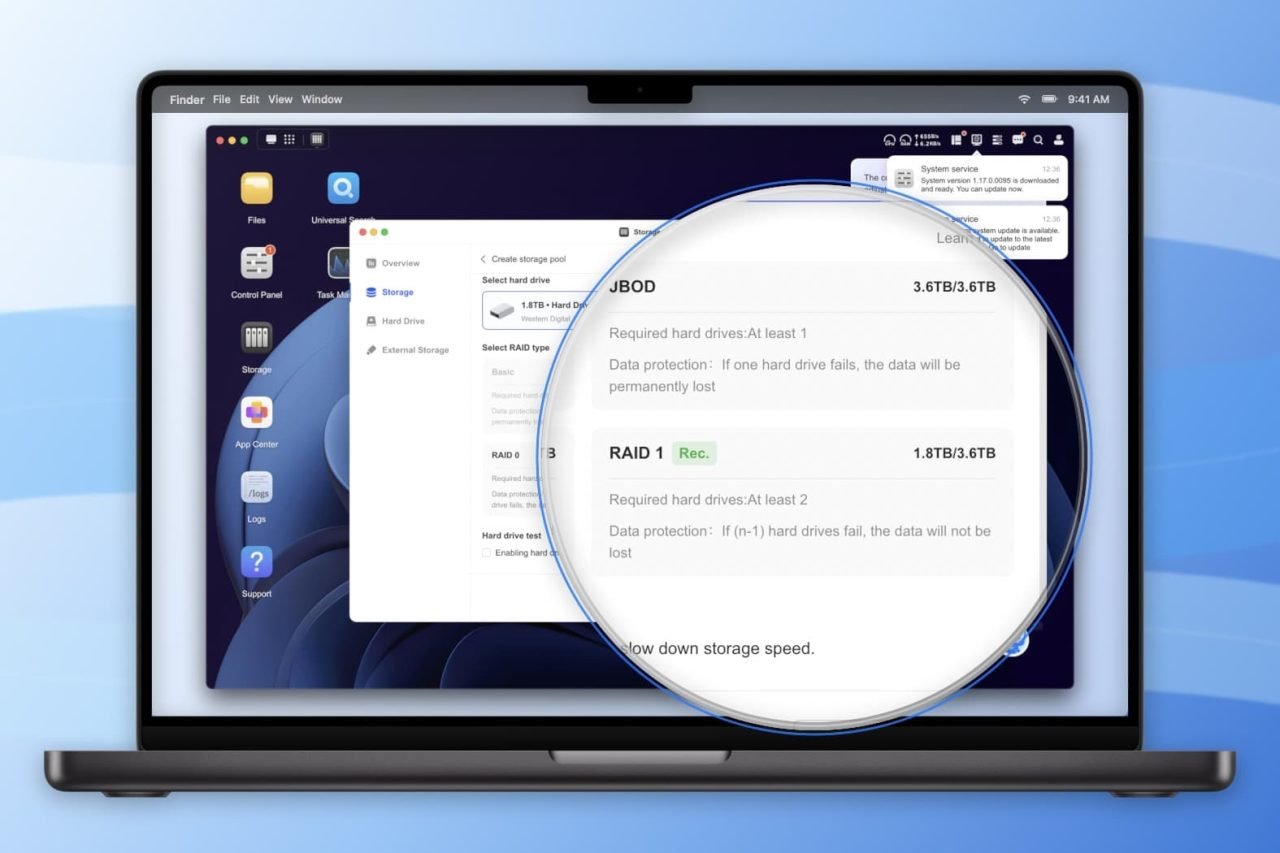
During my first login, UGOS Pro displayed several helpful tips highlighting available features and system settings. One of these notifications informed me that a firmware update was available. I installed the update before continuing my testing to ensure I was evaluating the latest software version.
Creating the storage pool was the only part of the setup where I paused to do a little research. Since this NAS will serve as my personal cloud, I wanted to choose the storage configuration that best fit those needs. After comparing the available options, I selected RAID 1, which mirrors the data across both hard drives. While this reduces the available storage capacity by half, it provides an important layer of redundancy. If one drive fails, the second drive still contains a complete copy of the data, helping protect my files until the failed drive can be replaced. For a device intended to store personal documents, photos, videos, and backups, that tradeoff was well worth it.
When formatting the storage pool, I also chose the Btrfs file system instead of ext4. Btrfs offers several advantages for long-term data storage, including snapshots, enhanced data integrity, and protection against silent data corruption. Since reliability was more important to me than extracting every last bit of performance, Btrfs was the clear choice for my use case.

Once the storage pool was created, the DH2300 began synchronizing the RAID array in the background. This process took several hours to complete. Although the NAS was fully accessible during that time, I noticed benchmark performance was significantly lower while synchronization was in progress. So, I waited until the storage pool reported a healthy status before performing any of the performance testing discussed later in this review.
Overall, I found the setup experience to be refreshingly approachable. Aside from spending a few minutes deciding which RAID level and file system best suited my intended use, the installation process required very little effort. UGREEN has done an excellent job of simplifying what has traditionally been one of the more intimidating aspects of owning a NAS, making the DH2300 an inviting option for first-time NAS users as well as those looking to move away from subscription-based cloud storage.

Testing
Because the UGREEN NASync DH2300 is marketed as a personal cloud storage solution, I wanted to evaluate it the way most owners will actually use it. While it’s possible to benchmark a NAS using a wired Ethernet connection, that doesn’t reflect the typical experience of someone accessing their files from a MacBook, iPad, smartphone, or desktop over Wi-Fi. Much like Dropbox, a personal cloud is designed to make your files available anywhere on your home network without requiring you to physically connect your computer to the device.
For that reason, all primary performance testing was conducted using a 2024 MacBook Pro with Apple’s M4 processor connected to my home network over Wi-Fi 6 (802.11ax). The DH2300 itself was connected to my network switch using its integrated Gigabit Ethernet interface, where it maintained a stable 1 Gbps connection throughout testing. My home network consists of AT&T Fiber service and an ASUS ROG Strix GS-BE18000 Wi-Fi 7 router.

To evaluate sequential storage performance, I mounted the NAS as an SMB network share in macOS and used both Blackmagic Disk Speed Test and AJA System Test Lite. Using multiple benchmarking applications helped confirm that the results were consistent rather than artifacts of a single benchmark.
Blackmagic Disk Speed Test
| Test Location | Write | Read |
|---|---|---|
| During RAID Sync | 15.5 MB/s | 96.4 MB/s |
| Same Room | 100.8 MB/s | 96.8 MB/s |
| Across House | 35 MB/s | 90.3 MB/s |
AJA System Test Lite
| Test Location | Write | Read |
|---|---|---|
| Same Room | 90 MB/s | 99 MB/s |
| Across House | 31 MB/s | 90 MB/s |
During my first round of benchmarks, I noticed that write performance was considerably lower than expected. While testing from a room on the opposite side of the house with several walls between my MacBook Pro and the router, write speeds averaged between 31 MB/s and 35 MB/s while read speeds remained between 84 MB/s and 90 MB/s.


To investigate further, I moved my MacBook Pro to the same room as the Wi-Fi router, placing it within approximately five feet of the access point while leaving every other part of the test environment unchanged. The results immediately improved. Blackmagic Disk Speed Test produced sequential transfer speeds of 100.8 MB/s for writes and 96.8 MB/s for reads, while AJA System Test Lite measured 90 MB/s write speeds and 99 MB/s read speeds using a 16 GB ProRes HQ workload.
This testing demonstrated that the DH2300 itself was not the performance bottleneck. Instead, wireless signal quality had a much greater impact on throughput than the NAS hardware. When the wireless connection was strong, the DH2300 consistently delivered transfer speeds that nearly saturated its Gigabit Ethernet interface. As the wireless connection weakened with distance and walls between the computer and the router, write performance decreased while read performance remained comparatively strong.


Synthetic benchmarks are useful for measuring a storage device’s maximum throughput, but they don’t always reflect how people use a personal cloud day to day. To evaluate real-world performance, I copied a 5.04 GB folder containing thousands of smaller files from my MacBook Pro to the DH2300 over my Wi-Fi network. The transfer completed in 5 minutes and 8 seconds.
While this was noticeably slower than the sequential benchmark results, it was also entirely expected. Copying large numbers of small files generates significantly more filesystem operations than transferring a single large video file, reducing overall throughput. Since personal cloud storage is often used for documents, photo libraries, application files, and other folders containing many small files, I found this test to be a more realistic representation of everyday performance than synthetic benchmarks alone.
While a wired Ethernet connection can certainly provide more consistent benchmark results, requiring a laptop to remain physically connected defeats much of the purpose of a personal cloud. The DH2300 is designed to make your files available anywhere on your network, and my testing reflects that real-world usage.
Living with the DH2300
While benchmark results and hardware specifications are important, they only tell part of the story. How well does it work in daily life? First of all, the system is very quiet. Even when actively transferring files or running background tasks, the DH2300 never became distracting. The cooling fan remained unobtrusive throughout my testing, making it easy to leave the NAS running in a home office without adding noticeable background noise.
Thermal management was equally impressive. The chassis remained cool during normal operation, and I never encountered any overheating issues. As long as the NAS is placed in a well-ventilated location where air can circulate freely around the enclosure, it appears to regulate its internal temperatures effectively.

UGOS Pro deserves a great deal of credit for making the overall experience not only approachable, but also enjoyable. The web interface is responsive, applications launch quickly, and navigating through the operating system feels smooth and polished. Whether I was browsing files, adjusting system settings, or checking the health of the storage pool, I never felt like I was waiting on the interface to catch up.
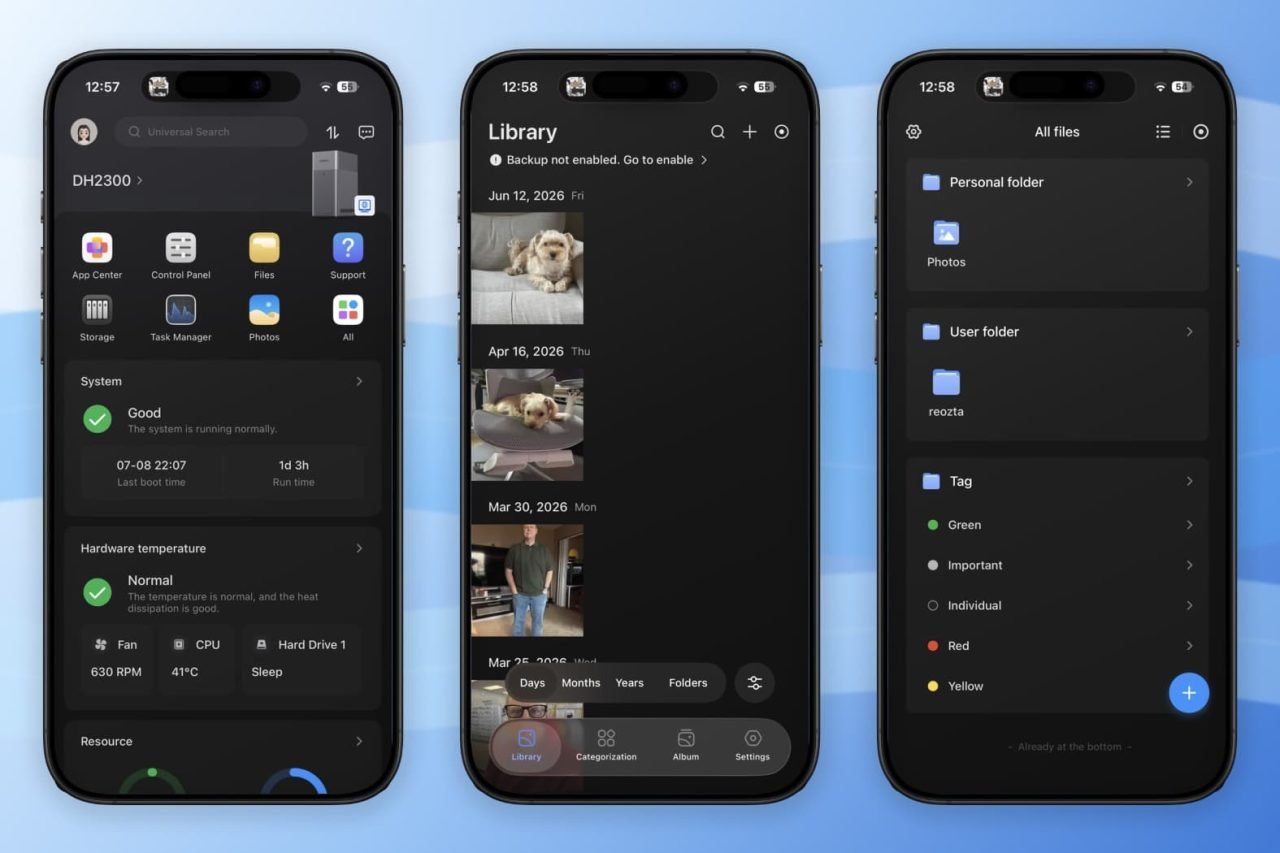
The mobile application was one of the biggest surprises during my testing. Many NAS manufacturers treat their mobile apps as simple companion applications that allow you to browse files or upload photos while requiring a desktop browser for nearly every administrative task. UGREEN has taken a different approach. The mobile app provides access to virtually all of the same management features available through the web interface, allowing me to configure the NAS, monitor system health, manage users, install applications, and adjust settings directly from my phone. It feels much more like carrying the entire operating system in your pocket than using a limited companion app.

The Photos application was another highlight. Anyone accustomed to Apple’s Photos app will immediately feel at home. The interface is clean and easy to navigate, while Smart Albums automatically organize images into useful categories, making it simple to locate photos without manually sorting thousands of files. It provides many of the conveniences users expect from commercial cloud photo services while allowing the entire library to remain stored on hardware they own.
Remote access was equally straightforward to configure. UGREEN assigns each NAS a unique UGREENlink ID, allowing users to securely connect to their personal cloud from outside their home network. After enabling the feature, I disconnected my phone from my home Wi-Fi and connected using only a cellular connection. Accessing the DH2300 remotely was as simple as entering the UGREENlink ID and signing in with my account credentials. Within moments, I was browsing files and using applications just as if I were connected to my local network.

Perhaps the biggest compliment I can give the DH2300 is that after the initial setup, I rarely had to think about it. It quietly handled file storage, backups, and remote access while staying out of the way. That’s exactly what I want from a personal cloud. Rather than requiring constant attention or maintenance, it simply became another trusted device on my network, making my files available whenever and wherever I needed them.
Conclusion
One of the big things that impresses me about UGREEN’s NAS devices is how approachable they are. I’ve set up other systems and have gotten completely lost in their sea of apps and required setup steps. UGREEN’s setup is as simple as they come. The UGOS Pro operating system UGREEN has built a NAS that removes much of the complexity traditionally associated with personal cloud storage. Whether I was backing up files, organizing photos, accessing documents remotely, or managing the system from my phone, the experience consistently felt intuitive and reliable.

As impressive as the DH2300 is as a personal cloud unit, there are some features I wish had been included. For starters, I would have loved to see it have 2.5GbE networking and it would have be amazing to have the option to connect to it directly for large file transfers.
That said, I don’t believe those omissions take away from what the DH2300 is trying to accomplish. UGREEN isn’t positioning this as an enterprise NAS or a video editing server. It’s designed to give individuals and families an easy way to take ownership of their data while enjoying many of the same conveniences offered by services like Dropbox or iCloud without ongoing subscription fees.
If you’re looking for a simple, well-designed personal cloud that is easy to set up, pleasant to use, and capable of quietly handling your everyday storage needs, the UGREEN NASync DH2300 is an excellent choice. It succeeds by focusing on the experience rather than overwhelming users with enterprise features they may never need, making it one of the most approachable entry points into the world of network attached storage.
For more information, visit nas.ugreen.com


