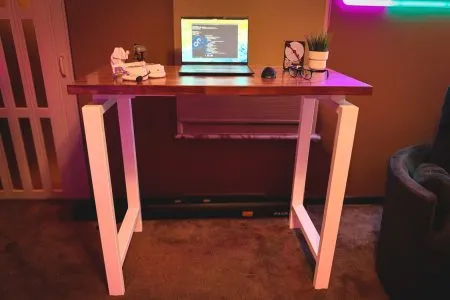
Big Things Really Do Come in Small Packages
The UPLIFT V3 Essential Standing Desk delivers impressive stability, thoughtful cable management, and a refreshingly painless assembly experience in a compact package. With its customizable desktop grommets, integrated charging ports, and clever cable management accessories, this desk feels like it was designed for people who love a clean setup but don't necessarily love the work that goes into maintaining one.
PROS
- Exceptional stability despite its smaller footprint
- Outstanding built-in cable management accessories
- Quick, straightforward assembly with preassembled components
- Customizable desktop grommets for charging, storage, and cable routing
- Convenient USB-A and USB-C ports on the keypad
- Compact design that makes efficient use of limited space
CONS
- Limited desktop space may not accommodate larger, multi-monitor setups
- The 46-inch desktop requires more intentional equipment placement
- DESIGN
- EASE OF USE
- FUNCTIONALITY
UPLIFT V3 Essential Standing Desk
Living With the UPLIFT V3 Essential Standing Desk
There’s something oddly satisfying about a perfectly organized desk. Everything has its place, cables are nowhere to be seen, and for a brief moment, you can convince yourself that the rest of your life is just as organized. Of course, anyone who has ever crawled underneath a desk to untangle a collection of power cords knows that achieving that picture-perfect setup usually involves a few choice words, a handful of zip ties, and a serious test of patience.
That’s where the UPLIFT V3 Essential Standing Desk enters the conversation. I’ve had experience with larger standing desks, including the Quadzen, so I was particularly interested in seeing how something with a smaller footprint would compare. Would it sacrifice stability? Would the compact desktop feel restrictive? And most importantly, would I be forced to spend an afternoon wrestling with cables just to make my setup look presentable? Fortunately, UPLIFT seems to have anticipated most of those concerns.
The V3 Essential may not have the sprawling surface area of a larger workstation, but what it lacks in size, it makes up for with clever design decisions that make every inch count. And when I say this desk was built for a clean setup, I mean it almost feels personally offended by visible cables.

About the UPLIFT V3 Essential Standing Desk
The V3 Essential is UPLIFT’s more compact, streamlined entry into its V3 standing desk lineup. It brings many of the practical improvements of the V3 platform into a desk designed for smaller offices, apartments, bedrooms, and dedicated workstations where space is valuable. My configuration features a 46-inch-wide, 24-inch-deep, and 0.75-inch-thick Walnut laminate desktop. At first glance, those dimensions might seem modest compared to the larger desks on the market, but that’s also part of the appeal.
Not everyone needs a desk large enough to host a Thanksgiving dinner. Sometimes you just want enough room for your essentials without turning your office into an obstacle course. The Walnut laminate surface offers a clean, professional appearance while resisting everyday scratches, dents, and moisture. Combined with the desk’s black frame and integrated accessories, the overall design is minimal without feeling basic. Underneath that compact desktop sits a three-stage, dual-motor height-adjustable frame capable of supporting up to 250 pounds. For a desk this size, that’s quite a bit of muscle.

Main Features
- Desktop dimensions: 46″ W × 24″ D × 0.75″ thick
- Desktop material: English Walnut laminate
- Height adjustment range: 22.6″ to 48.7″
- Lifting capacity: Up to 250 pounds
- Lift system: Smooth, quiet, three-stage dual motors
- Advanced keypad: Four programmable height presets
- Integrated charging: 18W USB-A and USB-C charging ports
- FlexMount Cable Manager: Included felt-style cable hammock
- Magnetic Cable Channel: Conceals cables running along the desk leg
- Desktop grommets: Two customizable cable-routing ports
- Safety: Anti-collision detection with automatic reversal

Pricing and Availability
The UPLIFT V3 Essential Standing Desk is available directly through UPLIFT’s website, with a listed starting price of $469 at the time of writing. The standard configuration includes the Walnut laminate desktop, V3 Essential frame, advanced keypad with USB charging, FlexMount Cable Manager, and Magnetic Cable Channel. Optional accessories and upgraded grommets can increase the final price, but having so many useful organizational features included right out of the box makes the Essential an appealing option for anyone building a workspace from scratch.
Assembly: Less Building, More Enjoying
I actually enjoy putting together new equipment. There’s something rewarding about turning a collection of parts into something useful. That being said, I don’t particularly enjoy opening a box only to discover that I’ve unknowingly signed up for a three-hour engineering class. Thankfully, assembling the V3 Essential was surprisingly straightforward. One of the first things I noticed when unpacking the desk was just how much of it came preassembled.

Compared to my experience with the Quadzen, UPLIFT had already taken care of a considerable amount of the groundwork. Even better, four screws were already positioned in the frame, and another four were preassembled in the feet. It’s a relatively small detail, but anyone who has spent time sorting through bags of nearly identical screws will appreciate it. Less guessing, fewer unnecessary steps, and significantly less time spent wondering whether you’ve somehow misplaced an important piece of hardware.
The legs immediately caught my attention, too. They were heavy. Not the kind of heavy that makes you question your decision to purchase the desk, but the reassuring kind that suggests the manufacturer didn’t cut corners. Picking them up gave me a pretty good indication that this desk would have some serious stability once assembled. Of course, heavy legs don’t automatically guarantee a sturdy desk, but they certainly gave me high expectations. As it turns out, those expectations weren’t misplaced. With so many components already assembled, the entire process felt refreshingly smooth. Rather than spending most of my time constructing the desk itself, I could focus on getting it set up exactly how I wanted. And honestly, that’s how assembling furniture should feel.

Cable Management: A Neat Freak’s Dream Come True
This is where the V3 Essential really started winning me over, I’ve always appreciated a clean workspace. There’s nothing worse than putting together a beautiful desk setup only to have a tangled jungle of cables hanging underneath it like some kind of technological spaghetti monster. Cable management is one of those things everyone wants to look great, but very few people actually enjoy doing. UPLIFT apparently understands this struggle.
The included FlexMount Cable Manager is essentially a felt hammock that hangs underneath the back of the desk. Rather than requiring you to carefully route and secure every individual cable, it provides a convenient place to tuck away cords, power bricks, and other accessories. It’s cable management for people who want to look organized without necessarily putting in all the effort. And I mean that as a compliment. Instead of spending an excessive amount of time painstakingly hiding every cable, I could simply organize everything into the hammock and move on with my life. It’s almost suspiciously easy.

The desk also includes a Magnetic Cable Channel, which runs along the leg and helps conceal cables traveling toward the floor. This is another feature that sounds relatively minor until you actually use it. Power cables running down the back of a desk are one of those little visual distractions that can ruin an otherwise spotless setup. The magnetic channel eliminates much of that problem without requiring permanent mods or complicated installation. Between the cable hammock and magnetic channel, UPLIFT has effectively addressed two of the biggest headaches associated with keeping a standing desk organized.
Two Little Holes, A Lot of Possibilities
The desktop features two cable-management grommets positioned near its rear corners. Normally, I wouldn’t get particularly excited about holes in a desk, but these aren’t just holes. UPLIFT offers customizable inserts that can transform these openings into power outlets, USB charging stations, cable pass-throughs, or small storage compartments. Depending on your configuration, you can turn an otherwise ordinary desktop opening into something genuinely useful.

Want charging access without reaching underneath your desk? There’s an option for that. Need somewhere to route your monitor cables without having them drape over the back edge? Easy. Want a small storage compartment for miscellaneous desk accessories? You can do that, too. It’s a level of flexibility that makes the V3 Essential feel more thoughtfully designed than its size might initially suggest. And because this desk measures only 46 inches wide, these features are arguably even more valuable than they would be on a larger workstation.
When desktop space is limited, organization stops being just an aesthetic preference and becomes an important part of functionality. Every cable you can route out of sight, every power brick you can hide, and every accessory you can move off the desktop gives you more usable working space. UPLIFT seems to have understood that perfectly. This is easily one of my favorite things here.

User Experience: Small Desk, Serious Backbone
Once everything was assembled, it was time to answer the question I was most curious about. How sturdy is this thing, really? I’ve used the Quadzen, and its stability gave me a pretty solid benchmark for what I expect from a quality standing desk. Naturally, I wanted to see whether the smaller V3 Essential could hold its own. My testing process was admittedly not very scientific. I pushed against the edge of the desk. Then I pushed a little harder. And then, because apparently I can’t leave well enough alone, I decided to see whether I could tip it over. For the record, I couldn’t without lifting the whole thing off the ground. The V3 Essential feels extremely sturdy, especially considering its compact footprint.
Pushing against the desktop edge produced a solid, reassuring feel that reminded me of the Quadzen. It didn’t feel flimsy, lightweight, or like a desk that was desperately hoping I wouldn’t lean on it. Quite the opposite. The heavy legs and solid frame create a surprisingly planted foundation, and the entire desk feels much more substantial than its dimensions might lead you to believe. Now, I’m not suggesting anyone should start using their standing desk as a wrestling opponent, but it’s nice knowing that normal bumps and everyday use aren’t going to send your workstation into a panic.

It’s also worth noting that a smaller desk doesn’t necessarily mean a less capable one. With a 250-pound lifting capacity, the V3 Essential has enough strength for a substantial computer setup, multiple peripherals, and the other equipment that tends to accumulate on a desk. The frame offers a height adjustment range from 22.6 to 48.7 inches, allowing users to transition between sitting and standing positions. The dual-motor system handles those transitions smoothly and quietly, while the built-in anti-collision feature adds protection against accidental obstructions. The result is a desk that feels ready for regular, everyday use rather than simply looking good in product photos.
A Keypad With a Few Tricks Up Its Sleeve
Another feature I particularly appreciate is the advanced control keypad. At first glance, it’s exactly what you’d expect: a convenient way to raise and lower the desk. But UPLIFT has included a few thoughtful touches that make it more useful than a basic control panel. For starters, the keypad features USB-A and USB-C charging ports on its side. This is a fantastic addition for a compact workstation. Instead of occupying valuable desktop space with another charging brick or hub, you have convenient charging access right at the edge of the desk.

The keypad also supports four saved height presets, making it easy to switch between preferred sitting and standing positions. But one of my favorite little details is that the keypad’s mounting position can be adjusted slightly forward or backward. This isn’t a feature that’s going to revolutionize the standing desk industry, but it’s the kind of small quality-of-life improvement I appreciate. Some people prefer their controls tucked neatly beneath the desktop edge, while others want them positioned farther forward for easier access. Having that little bit of flexibility makes it easier to position everything exactly where you want it. And on a desk that’s clearly been designed around maximizing functionality in a smaller space, those little details add up.
A Clean Setup Without the Compromises
After spending time assembling and testing the V3 Essential, one thing became increasingly clear. This desk knows exactly what it’s trying to be. It’s not attempting to compete with oversized workstations or sprawling gaming desks with enough surface area to accommodate a small village. Instead, it focuses on providing a clean, sturdy, functional workspace without wasting unnecessary room. And that’s why I like it so much.

The integrated cable management isn’t an afterthought. It’s one of the desk’s defining features. The customizable grommets aren’t simply decorative; they provide legitimate functionality that becomes important when working with a smaller surface. The advanced keypad doesn’t just move the desk up and down, it adds convenient charging access and flexibility. Even the assembly process reinforces the same philosophy: make things easier, cleaner, and more practical. Of course, the 46-inch desktop isn’t going to be ideal for everyone.
If you’re running an elaborate triple-monitor setup, a massive computer tower, multiple speakers, and enough accessories to open your own electronics store, you’ll probably want something larger. For a streamlined office setup, compact gaming station, or minimalist workstation, the V3 Essential makes an incredibly compelling argument. It turns out you don’t need more desk space when you’re making better use of the space you already have.

Conclusion
The UPLIFT V3 Essential Standing Desk is proof that smaller doesn’t have to mean sacrificing quality, stability, or functionality. From the moment I started unpacking it, the experience felt thoughtfully designed. The amount of preassembled components made the setup simple, the heavy-duty frame inspired confidence, and the finished desk delivered stability that genuinely impressed me.
Even after deliberately pushing against the desktop and attempting to tip it over, the V3 Essential held its ground. What really sets this desk apart is its approach to cable management. Between the FlexMount Cable Manager, Magnetic Cable Channel, customizable desktop grommets, and integrated USB charging ports, UPLIFT has created a workspace that practically begs to stay organized.

And on a compact 46-inch desktop, those features make a noticeable difference. The V3 Essential may not offer the sheer working area of larger alternatives like the Quadzen, but it doesn’t feel like a compromise in build quality. Instead, it feels like a carefully considered option for people who value a minimal, efficient setup. If you’re looking for a sturdy standing desk that maximizes functionality while minimizing clutter, the UPLIFT V3 Essential deserves serious consideration. It’s compact, it’s practical, and it’s incredibly well thought out. Best of all, it’s one of the few desks I’ve encountered that makes being lazy about cable management look like a design choice.
Frankly, that’s my kind of innovation.
For more information, visit UPLIFTDesk.com.