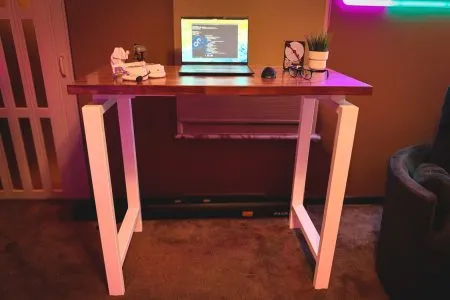
A Premium Standing Desk Built for Years of Comfortable Productivity
The UPLIFT Standing Desk V3 4-Leg delivers an outstanding combination of stability, craftsmanship, and flexibility that elevates the home office experience. Its robust construction, premium materials, and extensive customization options make it an excellent choice for anyone looking to replace a traditional fixed-height desk with a workspace designed for long-term comfort. While the initial investment is significant, the quality, performance, and ergonomic benefits make it a purchase that is easy to appreciate with everyday use.
PROS
- Exceptionally stable four-leg design with virtually no wobble
- Premium build quality and solid walnut butcher block desktop
- Smooth, quiet height adjustments with programmable presets
- Extensive customization options and accessory ecosystem
CONS
- Premium price may be beyond some budgets
- DESIGN
- EASE OF USE
- PRICE
UPLIFT Standing Desk, 4-Leg
Discover how the UPLIFT Standing Desk V3 4-Leg transformed a traditional home office with exceptional stability, premium craftsmanship, and ergonomic sit-stand functionality.
For many people, a desk is simply a place to put a computer. As long as it holds a monitor, keyboard, and mouse, it gets the job done. That’s exactly how my fiancé’s mother’s husband (Ron) approached his home office for years. Like countless others, he used a traditional manufactured particleboard computer desk that provided a dedicated workspace but little else. It was functional, affordable, and met his needs for everyday productivity.
Over time, however, those hours at the desk began to add up. Whether checking email, browsing the web, managing finances, or simply spending time on the computer, he often remained seated for extended periods. The desk itself wasn’t uncomfortable, but it also wasn’t designed to adapt to the person using it. Sitting in the same position day after day can contribute to stiffness, fatigue, and poor posture, especially when there are few opportunities to change positions throughout the day.


When we had the opportunity to review the UPLIFT Standing Desk V3 4-Leg, we immediately saw it as more than just another piece of office furniture. It was a chance to completely rethink his workspace and replace a traditional fixed-height desk with one designed to promote comfort, flexibility, and long-term ergonomics. The goal wasn’t simply a nicer desk. It was to create a workspace that could better support the amount of time he spends at his computer each day.
The UPLIFT Standing Desk V3 4-Leg is designed for users who want exceptional stability, premium materials, and the freedom to alternate between sitting and standing throughout the day. In this review, we’ll take a closer look at the assembly process, build quality, daily use, and whether upgrading from a conventional computer desk to a premium standing desk is a worthwhile investment.


About the UPLIFT Standing Desk V3 4-Leg
The UPLIFT Standing Desk V3 4-Leg is designed for users who need a spacious, highly stable workstation that can support demanding office or creative setups. As the most robust model in UPLIFT’s standing desk lineup, it features four synchronized lifting columns that provide enhanced stability and a lifting capacity of up to 535 pounds. Whether you’re using multiple monitors, heavy desktop equipment, or a large work surface, the V3 4-Leg is engineered to maintain a solid foundation throughout its height range.
Like the rest of the V3 family, the desk includes UPLIFT’s updated frame design, anti-collision technology, an extensive selection of desktop materials and sizes, and compatibility with the company’s wide range of accessories. Buyers can customize nearly every aspect of the desk, from the desktop finish and frame color to storage options, cable management, and ergonomic add-ons, making it easy to tailor the workstation to individual needs.
Backed by a 15-year warranty, the UPLIFT Standing Desk V3 4-Leg is aimed at professionals, content creators, gamers, and anyone looking for a premium sit-stand desk that combines durability, customization, and long-term reliability.


Features
- Four-leg design for exceptional stability
- Smooth electric sit-to-stand adjustment
- Anti-collision detection system
- Programmable memory presets (depending on the selected keypad)
- Optional Bluetooth connectivity through the UPLIFT Desk App
- FlexMount Cable Management System
- Patented 40-point accessory mounting system
- Extensive desktop material and finish options
- Multiple frame color choices
- Wide range of compatible accessories and organizational add-ons
- Simplified assembly with pre-installed hardware
- Backed by a 15-year warranty


Specifications
| Specification | Details |
|---|---|
| Frame Type | Electric four-leg standing desk |
| Lift System | Four synchronized motors |
| Lift Capacity | Up to 535 lb (243 kg) |
| Height Range | 22.6” to 48.7” (with a 1” desktop) |
| Leg Design | Three-stage telescoping columns |
| Height Adjustment Travel | 26.1 inches |
| Ergonomic Standard | ANSI/BIFMA G1-2013 compliant |
| Safety Certification | ANSI/BIFMA X5.5-2021 tested |
| Included Cable Management | FlexMount Cable Manager and 10 reusable cable wraps |
| Desktop Sizes | Multiple options ranging from 48” to 80”+ (varies by desktop material) |
| Desktop Materials | Laminate, bamboo, rubberwood, solid wood, reclaimed wood, and more |
| Frame Colors | Black, White, Gray, Industrial Gray |


Unboxing and Assembly
Having assembled several UPLIFT desks in the past, including the V3 Standing Desk, the assembly process felt immediately familiar. The desk arrived in multiple well-protected boxes, with the solid walnut butcher block desktop and steel frame packaged securely to prevent damage during shipping.
Because of the desk’s weight, I needed assistance bringing the boxes into the house. Once everything was unpacked, however, I completed nearly the entire assembly by myself. The instructions were easy to follow, the hardware was clearly labeled, and many of the components arrived partially assembled to simplify the process.


From start to finish, assembly took approximately one hour and 42 minutes. The only point where I needed another person was flipping the completed desk upright. Between the 1.5-inch solid walnut desktop and the substantial four-leg frame, this is definitely a two-person task.
To make the desk easier to reposition in the future, I also installed the optional Soft Roll Casters. Given the overall weight of the completed desk, this proved to be a worthwhile addition.
Creating a Better Workspace
Once assembled, we moved everything from his previous desk to the new workspace. His setup is relatively straightforward, consisting of a 32-inch monitor, keyboard, mouse, fiber gateway modem, and various everyday office supplies. His desktop tower remains on a stand beside the desk, while the printer sits on a nearby file cabinet.
Although his workstation isn’t particularly elaborate, the larger work surface immediately made the space feel more organized. There was plenty of room for his computer equipment while still leaving open workspace for paperwork and other daily tasks.
To complete the setup, we added several UPLIFT accessories, including the DuoMount monitor arm, Cup Holder & Tumbler, Writing Desk Pad, FlexMount Cable Manager, and a six-outlet mountable surge protector. Together, these accessories created a cleaner and more organized workspace without adding unnecessary clutter.


Everyday Use
The biggest improvement that Ron has seen wasn’t any single feature. It was how much more substantial the entire workstation felt. He thinks it’s extremely well-built and thanks to the casters, it’s very easy to move. He also really likes the cup holder and the extra outlet box. They are both easy to relocate, which Ron appreciates.
The electric motors were equally impressive. Despite the desk’s size and weight, transitions between sitting and standing were smooth and surprisingly quiet. The Advanced Keypad makes it easy to adjust heights with the press of a button.
The desk is remarkably stable. Whether typing, using the mouse, or raising and lowering the desktop, the four-leg frame remained exceptionally solid. Compared to the manufactured desk it replaced, there was very little movement, giving the entire workspace a premium feel.
The solid walnut butcher block desktop also made a noticeable difference. Beyond its attractive appearance, the thicker work surface adds to the desk’s overall feeling of quality and durability.

Cable Management
One area that often gets overlooked during a desk upgrade is cable management. Using the FlexMount Cable Manager together with the mountable surge protector made organizing the various power and monitor cables surprisingly easy. Once everything was connected, the underside of the desk remained neat and organized, helping the finished workspace look much cleaner than the previous setup.


Standing Throughout the Day
Perhaps the biggest change wasn’t the desk itself but the flexibility it introduced into the daily routine. Instead of remaining seated for hours at a time, he now has the option to alternate between sitting and standing whenever he chooses. Because the desk adjusts quickly and quietly, changing positions takes only a few seconds. That convenience encourages movement throughout the day without interrupting whatever task is at hand.

Overall Impressions
Replacing a traditional manufactured desk with the UPLIFT Standing Desk V3 4-Leg transformed the workspace in ways that extend beyond aesthetics. The desk feels exceptionally well built, provides outstanding stability, and offers a level of flexibility that simply wasn’t possible with a fixed-height desk.
It is certainly a premium product, and its weight reflects the quality of its construction. Adding the Soft Roll Casters was a practical decision that makes repositioning the desk much easier whenever necessary.

While the investment is considerably higher than that of a typical computer desk, the combination of premium materials, thoughtful engineering, and the ability to support healthier working habits makes it a meaningful upgrade for anyone who spends long hours at a desk, even if their daily computer use consists primarily of routine productivity tasks.
Conclusion
Upgrading from a traditional manufactured computer desk to the UPLIFT Standing Desk V3 4-Leg proved to be much more than a cosmetic improvement. While the old desk provided a functional place to work, the UPLIFT transformed the workspace into one that is more comfortable, organized, and adaptable to long hours at the computer.

Throughout our time with the desk, its exceptional stability stood out as its defining characteristic. The four-leg frame remained remarkably solid whether typing, adjusting the monitor, or transitioning between sitting and standing. Combined with the premium solid walnut butcher block desktop, quiet motors, and thoughtful accessory ecosystem, the desk consistently delivered a polished user experience.

The UPLIFT Standing Desk V3 4-Leg is undoubtedly a premium investment, but its build quality, customization options, and long-term durability help justify the price. For anyone who spends several hours a day at a desk, whether working remotely, managing a home office, or handling everyday productivity tasks, it offers meaningful improvements that extend well beyond aesthetics.
For more information, visit upliftdesk.com